
Table of Contents
The Ultimate Guide to Professional IPTV Encoders: Revolutionizing Your Streaming Workflow
You’ve spent countless hours meticulously selecting cameras, mastering lighting, and engineering a bulletproof streaming infrastructure. Yet, sometimes it still happens: the visual artifacting, the latency peaks, and the momentary black screens that make your high-definition feed look like a grainy archive tape. In the high-stakes, hyper-competitive landscape of modern digital broadcasting, your signal is only as robust as the final link in the physical chain that processes it. For streaming professionals, an IPTV encoder isn’t just a convenient utility box; it is the vital heartbeat of your entire delivery operation—the crucial bridge that transforms your high-resolution baseband video into a compact, stable digital feed optimized for IP network transport.
I. Understanding the Core: What Are IPTV Encoders?
At its most fundamental level, an IPTV encoder functions as a highly specialized translation engine. To fully appreciate its function, we must understand the fundamental problem it solves. Professional broadcasting gear outputs massive, uncompressed data streams. A standard, 10-bit 1080p60 baseband signal traveling over an SDI cable is pushing nearly 3 Gigabits per second (Gbps). Sending this raw feed over even the most advanced corporate network, let alone the public internet, is mathematically impossible without catastrophic packet loss.
The IPTV encoder is designed specifically to accept this multi-gigabit raw video input—via professional interfaces like HD-SDI or consumer standards like HDMI—and use advanced mathematical algorithms (known as codecs) to compress that massive data payload. This process identifies and removes temporal and spatial redundancies in the video frame, transforming 3 Gbps of raw video into a streamlined, high-efficiency data packet of, for example, 8 Megabits per second (Mbps). Once compressed, the encoder then encapsulates this data within specific IP network protocols (like RTMP or SRT), allowing it to travel seamlessly to a streaming server, a cloud CDN, or directly to end-user devices.
IPTV Encoder Definition: An IPTV encoder is a dedicated hardware appliance or software application that receives raw video and audio signals and compresses them using efficient codecs (like H.264, HEVC, or AV1) into a digitized, network-ready IP format (such as TS, RTMP, or SRT).
The Historical Context: The Shift to IP
Understanding the “why” behind modern encoding requires looking back at the traditional broadcasting landscape. For decades, video distribution within large facilities—like stadiums, campuses, and hotels—relied on heavy coaxial cables carrying Analog RF (Radio Frequency) or, later, QAM signals. This infrastructure was expensive to install, notoriously difficult to troubleshoot (a signal issue could be a loose connector five floors away), and entirely one-way, offering zero potential for interactivity.
The arrival of IPTV revolutionized this entirely. IPTV leverages standard Ethernet cabling (Cat5e/Cat6) and existing network switches, converting video feeds into efficient data packets just like any other file transfer or web request. This transition did not just lower infrastructure costs; it paved the way for bidirectional communication, enabling the dynamic program guides (EPGs), interactive video-on-demand (VOD), and powerful targeted advertising systems that now define modern media consumption. The IPTV encoder is the technology that makes this seamless conversion from old-world analog and baseband signals to the modern, efficient, data-driven IP ecosystem possible.
Hardware vs. Software Encoders: Making the Critical Choice
When you initiate your search for professional streaming gear, you will immediately encounter the foundational debate that has defined digital media workflows for years: Should you invest in dedicated hardware encoding appliances, or should you build your architecture around powerful server-based software solutions? There is no single “correct” answer, as the ideal choice depends heavily on your stability requirements, density needs, budget, and physical environment.
Hardware IPTV Encoders: The Benchmark of Stability
For a 24/7/365 deployment, hardware is almost universally the preferred solution among experienced broadcasting engineers. Why? Hardware encoders use dedicated, specialized chips—known as ASICs (Application-Specific Integrated Circuits) or FPGAs (Field-Programmable Gate Arrays)—which are factory-optimized and “hardened” solely for video encoding and protocol processing.
This singular focus delivers several crucial professional advantages:
- Industrial Reliability: They do not have general-purpose operating systems (like Windows or Linux) that can crash due to a buggy driver, a background security update, or a memory leak in an unrelated application. A hardware encoder boots up and runs a single task.
- Ultra-Low Latency: Because the encoding process is handled by dedicated microchips, the physical encoding process often adds less than 10ms of delay to the signal path. This is critical for real-time applications like live interviews or remote operating.
- High Density: Manufacturers can pack 4, 8, or even 16 independent encoding channels into a single 1U rack space, with each channel often having its own dedicated processor and power supply connection for true hardware redundancy.
- Optimized Cooling and Form Factors: These units are designed for server room environments, featuring high-static-pressure fans and airflow paths optimized for continuous 1U rack operation.
Software IPTV Encoders: The Peak of Flexibility
In stark contrast, software encoders (like Telestream Wirecast, OBS Studio, or vMix) are applications designed to run on top of a standard Windows, macOS, or Linux operating system. They rely on the host computer’s general-purpose CPU (and sometimes a dedicated GPU like an NVIDIA NVENC) to perform the encoding calculations.
While software lacks the raw, single-purpose stability of hardware, it offers incomparable versatility for certain workflows:
- Unlimited Flexibility: A software encoder can instantly become a mixer, a graphics generator, a multi-view monitor, or a chroma-key system. It can receive and output any format the software vendor chooses to support, sometimes with only a small patch update.
- Dynamic Scalability (in the Cloud): In a cloud-based architecture (like AWS or Azure), software encoding instances can be spun up or down dynamically. Need to encode 100 new channels for one weekend event? You can rent 100 virtual machines for two days, a workflow that would be physically impossible with hardware.
- Rapid Adopter of New Codecs: When a new standard like AV1 or VVC is finalized, software vendors can deploy compatibility in weeks, whereas new hardware ASICs take 18–24 months to design, manufacture, and integrate into shipping products.
The Verdict: A Hybrid Future
For most high-reliability scenarios—like a corporate network distributing live company updates or a local TV station sending a continuous feed to their primary cable headend—dedicated hardware IPTV encoders are the clear, engineering-justified choice. The massive advantage in reliability, physical density, and predictable latency far outweighs the slightly higher upfront hardware costs. Software encoders excel in temporary setups, environments where multi-input mixing and dynamic graphics are prioritized over raw signal transport stability, and large-scale, elastic cloud processing workflows.
Inside the Encoding Pipeline: Step-by-Step
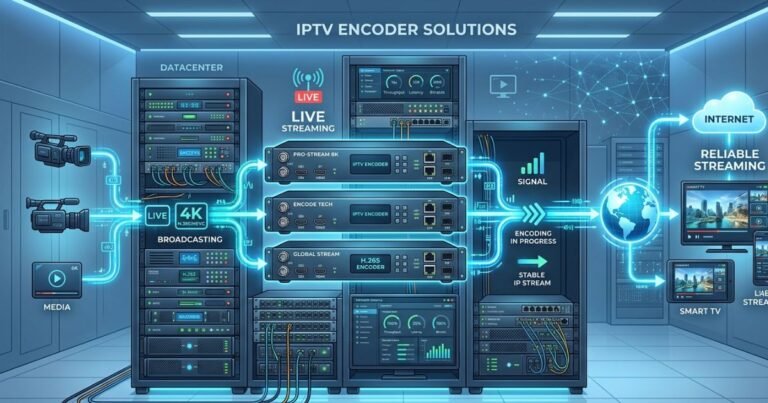
Understanding the signal’s journey is crucial for troubleshooting. Let’s break down the physical architecture of a typical hardware IPTV encoder to see how your raw camera feed becomes a global network packet.
Figure 1: The Modern IPTV Signal Flow
(Place Image_0.png here)
Alt Text: A professional illustration of a technical network diagram showing how video signals (H.264/HEVC) flow from professional cameras, through multi-channel IPTV encoders (labeled ‘PRO-STREAM 8K’ and ‘H.265 ENCODER’) in a datacenter, and out to the global internet to deliver a ‘STABLE IP STREAM’ to diverse end-user devices.
As visualized in the diagram above, the actual conversion process follows a precise four-stage physical architecture within the encoder:
- Physical Video Ingest (The Inputs): On the rear of the encoder, you connect your raw, baseband sources. In professional hardware, you will primarily see BNC connectors for SDI (Serial Digital Interface). The SDI input is preferred because it uses a locking connector, can transmit video for hundreds of feet (crucial in large datacenters or stadiums), and carries ancillary metadata (like timecode and embedded audio) easily. Consumer-focused or hospitality units may also use HDMI (High-Definition Multimedia Interface) inputs for connecting satellite receivers or media players.
- Raw Signal Digitization: The physical analog (if applicable) or raw digital signal is captured. The encoder syncs to the incoming signal’s exact frame rate and resolution (e.g., 1080i59.94 or 2160p60). This is the last point in the path where the signal is truly uncompressed and raw.
- H.264 / HEVC Video Compression (The Hard Part): This is the core task performed by the specialized ASIC or FPGA chip. The raw video is analyze frame by frame.
- Spatial Redundancy: The encoder looks within a single frame. If you are showing a wide shot of a soccer pitch, the grass texture remains identical across massive areas. The encoder describes this field area with a small mathematical model, saying “draw a field texture here,” rather than saving every single individual green pixel.
- Temporal Redundancy: The encoder looks between frames. A simple video stream is often 30 to 60 distinct images per second. If your camera is static on a speaker at a podium, 98% of the information on the wall behind them does not change from frame 1 to frame 2. The encoder cleverly remembers the previous frame and only describes the difference—the tiny movements of the speaker’s mouth, hands, and blinking eyes. This is the mechanism responsible for the massive, 99.9% reduction in bandwidth required for transport.
- Transport Packetization and Encapsulation (The Wrapper): Once the video and audio are efficiently compressed into tiny data blocks, they must be organized and labeled so other network devices can understand them. The compressed data is split into standardized packets (like UDP or SRT packets), timestamped, given a source address, and then pushed out of the encoder’s physical Ethernet port (labeled ‘IP OUTPUT’ on hardware) and onto your facility’s network switch.
Audio Encoding: Don’t Forget the Sound
Video may require 95% of the processing power, but proper audio encoding is just as vital to the viewer experience. A standard hardware IPTV encoder almost always performs simultaneous audio processing. The incoming audio (embedded in the SDI/HDMI signal) is captured, processed for level stabilization, and then compressed, usually employing the AAC (Advanced Audio Coding) standard. AAC is chosen for its near-universal compatibility and its ability to deliver transparent, professional-grade stereo sound at a very low bitrate, often just 128 to 256 kbps.
II. Critical Features of High-Performance IPTV Encoder Solutions
When you evaluate different IPTV encoder solutions, the marketplace can appear bewilderingly complex. You are trying to balance initial equipment acquisition costs against future-proofing, operating expense (specifically bandwidth), and system management. The experienced engineering choice is never based solely on price; it is based on selecting the precise hardware specification that satisfies your latency requirements, delivers your target visual quality, and provides the long-term reliability required for your unique operation. In 2026, several high-impact features are no longer optional for professional-grade setups.
1. Advanced Compression Standards: The H.264 vs. HEVC Battle
The choice of compression codec is the single most impactful variable in your entire streaming architecture, as it defines your required bandwidth and, by extension, your distribution costs.
H.264 (AVC – Advanced Video Coding): The Robust Veteran
H.264 remains, by a significant margin, the single most compatible video standard in human history. This codec is so pervasive that practically every digital device manufactured since 2010—including old smartphones, tablets, aging PCs, and basic set-top boxes—contains dedicated H.264 hardware decoding chips.
- When to Use H.264: Choose H.264 if your highest priority is universal compatibility across all viewer devices and you operate within an environment where network bandwidth is either unlimited or exceptionally low-cost (such as an internal corporate network or high-capacity facility backbone).
- The Problem: H.264 is over 20 years old. It is fundamentally inefficient when processing modern resolutions. Delivering a sharp 1080p stream using H.264 often requires 5-8 Mbps; attempting 4K video is highly problematic, often requiring an unmanageable 25 Mbps or more.
H.265 (HEVC – High-Efficiency Video Coding): The Modern Workhorse
HEVC is the current professional and broadcast standard for modern, high-quality media. It uses significantly more sophisticated predictive mathematical modeling during the encoding process to deliver dramatic gains in compression efficiency.
- When to Use HEVC: Use HEVC for all new IPTV encoder deployments where bandwidth optimization is a priority, or whenever you need to deliver resolution at 1080p60, 4K, or higher. It is essential for hospitality TV systems carrying hundreds of channels, where reducing bandwidth directly reduces infrastructure requirements and maintenance complexity.
- The Advantage: The efficiency gain is staggering. HEVC provides identical visual quality to H.264 while using roughly 50% less bandwidth. You can deliver a vibrant 1080p feed at 3-4 Mbps instead of 8, a massive operating cost savings that instantly justifies the slightly higher hardware acquisition cost for the encoder. Furthermore, HEVC is a prerequisite for professional 4K streaming.
The Rise of AV1: The Open-Source Future
While HEVC currently rules the professional hardware landscape, the open-source community, led by giants like Google, Netflix, and Amazon (as the Alliance for Open Media), has developed AV1. AV1 offers even greater compression efficiency than HEVC (approximately 20-30% more efficient), has excellent hardware decode support in very new consumer devices, and is royalty-free, making it extremely attractive to major content delivery networks.
Pro Tip: For a stable 24/7 internal network or regional headend in 2026, IPTV encoders built on mature H.265/HEVC ASICs provide the ideal balance of hardware reliability, visual quality, and manageable bandwidth costs. While software vendors are adopting AV1 rapidly, mature hardware encoders that are certified for 24/7 AV1 operation are only just beginning to proliferate and often carry a significant price premium.
2. Physical Input Density and Redundancy
In professional enterprise environments, physical space is an exceptionally costly commodity. Experienced engineers avoid “cluttering” their expensive datacenter racks with dozens of individual single-channel encoder appliances. They instead seek out high-density, multi-channel chassis solutions. These optimized systems (like the racks visualized in Image_0.png) allow you to pack 4, 8, or even 16 independent SDI encoding modules into a single 1U (1.75-inch-tall) rack space.
Furthermore, a true professional-grade IPTV encoder solution must feature hardware-level redundancy. A critical point of failure in any electronic device is the power supply unit (PSU). High-end encoders will feature Dual Hot-Swappable Power Supplies. Both PSUs are plugged into different power circuits, allowing one to fail without interrupting the stream for even a millisecond, which is paramount for a high-value signal path.
3. Professional Protocol Support (The Languages of the Network)
If the codec is the language the video speaks (like English), the transport protocol is the container it is shipped in (like a reliable courier service vs. standard post). To integrate with modern cloud infrastructures and diverse player devices, a professional encoder must support a versatile suite of IP protocols.
| Transport Protocol | Primary Use Case | Primary Professional Advantage |
| UDP (User Datagram Protocol) | Internal Multicast (Hotels, Offices) | Lowest complexity, minimum overhead. Required for IPTV distribution in large facilities where one stream hits 1000 TVs without overwhelming the router. |
| RTP (Real-time Transport Protocol) | Legacy Internal Multicast | Offers synchronized video and audio delivery. Often combined with UDP. |
| RTMP (Real-Time Messaging Protocol) | Legacy CDN Ingest (e.g., streaming to YouTube Live) | Still widely supported by older middleware but is considered legacy due to being TCP-based (causing high latency) and limited to H.264 only. |
| SRT (Secure Reliable Transport) | The Modern Professional Standard | Highly efficient. SRT provides the raw speed and low overhead of UDP, but dynamically optimizes for difficult, packet-loss-heavy networks (like the public internet) to ensure zero packet loss and incredibly low latency. |
| HTTP (HLS/DASH) | Direct Streaming to Clients (e.g., web players) | Uses “standard web traffic” protocols. Highly compatible with modern devices but introduces significant latency (often 5–30 seconds) and is managed by a distribution server, not the encoder directly. |
A top-tier hardware encoder in 2026 will support concurrent multi-protocol streaming, meaning it can ingest one high-quality SDI signal and simultaneously output an SRT stream to your primary video hub for redistribution, an RTMP stream for archive purposes, and a UDP multicast feed for in-house monitors—all from a single physical input port.
4. Direct 4K and Ultra-High-Definition Support
If your operation involves live sports, cinematic content, or high-value corporate events, 4K is your required standard. However, you must look closely at the encoder’s technical specification rather than just relying on the “4K” marketing label.
- HDMI 2.0 / 12G-SDI Input: A 4K@60fps uncompressed signal requires an exceptionally high-bandwidth connection. Your encoder MUST feature a physical HDMI 2.0 port or, more commonly in professional setups, a single 12G-SDI interface. Older hardware (or cheaper software) will limit you to 4K@30fps, which is unacceptable for action-oriented content and will appear jarring to your audience.
- H.265 (HEVC) is Mandatory for 4K: As emphasized previously, attempting to stream 4K resolution using H.264 is technically futile. You will either suffer from massive visible artifacting at a manageable bitrate or be forced to use an immense bitrate that no network can sustain. Professional 4K encoders always use H.265 (HEVC) or, on very new equipment, AV1 to maintain crystal-clear visuals at a manageable 15–25 Mbps.
III. Comparing the Best Professional IPTV Encoder Solutions
Choosing the exact IPTV encoder hardware and vendor required for your project depends intensely on your environment, scale, and specific tolerance for downtime. An experienced copywriter will always advise looking beyond raw performance metrics to consider long-term operating costs, physical density, and hardware redundancy. The market is broadly divided into four key physical architecture types, each optimized for a distinct use case.
Table 1: Comparative Breakdown of IPTV Encoder Hardware Architectures
| Feature | Portable/Mobile Encoder (e.g., Teradek VidiU) | Single-Channel Desktop Encoder | Professional Rackmount Chassis (e.g., VeCODER ULTRA) | Server-Based Software Encoder (vMix/Wirecast) |
| Ideal For | Live Mobile Broadcasts, On-Location Events | Internal CCTV, Digital Signage, One-Room Studios | Enterprise Networks, Hospitality TV, 24/7/365 Channels | Cloud-Scale CDNs, Multi-Stream Mixing, Elastic Workflows |
| Stability | High | Maximum | Critical: Industrial-Grade Reliability | Variable (OS-Dependent) |
| Input Options | Single HDMI | Single HDMI | High-Density: Multi-SDI or 12G-SDI | Capture Card Required |
| Codec Support | H.264, often HEVC (basic) | H.264, basic HEVC | HEVC (Main10 Profile), H.264, RTMP, SRT | H.264, HEVC, NDI, AV1 (Rapid Adoption) |
| Network Output | Single RJ45, sometimes 4G/5G Bonding | Single RJ45 | Multi-1G, 10G SFP+ Optional | Variable (Server NICs) |
| Physical Density | Very Low (Standalone) | Low (Standalone) | Extreme: Up to 16 Ch/1U | Low (Server Chassis) |
| Management | Individual Web UI | Individual Web UI | Unified Enterprise Software Control | Local PC Control |
| Typical Cost | $500 – $1,000 | $200 – $600 | $1,500 – $10,000+ per Unit | $500 – $1,200 (Licensing Only) |
Making the Choice for Your Operation
- For a Multi-Room Stadium, Campus, or Hotel: Your critical priorities are high-density chassis, extreme reliability (Dual PSUs), and efficient H.265 compression for hundreds of channels. This is where professional 1U and 3U rackmount encoders dominate.
- For On-Location Live Events or Journalism: You cannot deploy a server rack in the middle of a street. Portable encoders (often with built-in 4G/5G modems and high-capacity batteries) are the correct choice, even if they sacrifice 24/7 reliability metrics.
- For Cloud-First, Large-Scale Content Delivery (CDN): If your goal is to distribute one signal to 100,000 simultaneous viewers, the best strategy involves a simple, high-quality encoder on-site pushing one stable stream (perhaps using SRT) to powerful virtual machine instances running software encoding in the cloud (like AWS MediaLive) to handle massive redistribution and device compatibility.
IV. Setting Up Your IPTV Encoder for Success: A Step-by-Step Technical Guide
Even the most sophisticated multi-channel encoder with dual power supplies will perform miserably if you connect it with an out-of-spec network cable or misconfigure its crucial technical settings. Setting up an IPTV stream is a physical engineering task, not just a software configuration. In 2026, an experienced engineer must execute a precise setup procedure to ensure long-term stability and peer-to-peer performance.
1. The Physical Environment and Connections
Your encoder’s physical journey begins at the connector panel.
- SDI vs. HDMI for Pro Installs: For a permanent installation, prioritize SDI (Serial Digital Interface). The Locking BNC connector ensures the cable cannot be accidentally dislodged during critical moments. Furthermore, SDI signals can travel hundreds of feet through high-quality copper cabling without signal degradation, whereas HDMI is notoriously fragile and maxes out at approximately 30 feet without expensive active boosting.
- Power Redundancy is Key: If your hardware encoder features Dual Power Supplies, connect PSU 1 to your primary UPS (Uninterruptible Power Supply) circuit and PSU 2 to your facility’s critical backup generator circuit or a second, independent UPS. This dual-source configuration provides true resilience against an isolated power strip failure or a single UPS malfunction.
- Cooling and Rack Integrity: Hardware encoders operate continuous mathematical algorithms and generate considerable heat. Ensure they are mounted in a clean, air-conditioned rack with at least one empty unit of space above and below them, providing a clear pathway for proper front-to-back airflow.
2. Strategic Network Integration
The physical connection to your facility’s network backbone is where most stream stability issues originate.
- Gigabit is Minimum; 10G is Better: A modern encoding infrastructure pushing multi-channel HEVC feeds requires exceptionally robust connectivity. A Gigabit Ethernet (RJ45) connection is the functional minimum. For high-density rack setups (8+ channels) and 4K workflows, demand hardware encoders with 10-Gigabit SFP+ ports. This physical interface allows for direct connection via fiber optic cabling to your network core, eliminating bottlenecks before they start.
- Always Use Static IP Addresses: An IPTV encoder is a foundational infrastructure server. You must never allow it to receive an IP address via DHCP, which can change upon reboot and crash your entire downstream architecture. Assign a dedicated, known static IP address outside your client pool, ensuring that your monitoring systems, distribution servers, and player devices can always find the critical feed.
- Physical Port Isolation for Management: In high-security enterprise environments, prioritize encoders that feature physical Port Isolation. Use one physical port exclusively for video streaming data and a second physical port for management traffic (e.g., the encoder’s Web UI). This physical separation ensures that a security breach in your administrative network can never directly interrupt your broadcasting traffic, which travels on its own network segment.
3. Key Encoding Settings: The Variables of Quality
Once physically connected, you will manage the specific compression settings through the encoder’s Web-based administration console. When configuring a stream, three interrelated technical settings define your visual output quality:
Step A: Bitrate Selection (The Bandwidth Allocation)
Bitrate is the most critical quality determinant. It represents the total amount of digital data you allow the codec to generate to describe one second of video. In an experienced engineer’s workflow, a slightly higher bitrate always results in less compression “noise,” sharper image clarity, and smoother motion handling.
Core Rule: Use HEVC/H.265 to Halve These Bitrates
- High-Definition 1080p60 (Sports/Action): Aim for H.265 (HEVC) at 3 to 5 Mbps (or H.264 at 8 to 12 Mbps).
- High-Definition 1080p30 (Corporate/Talk): Achieve professional results with H.265 (HEVC) at 2 to 3 Mbps (or H.264 at 5 to 8 Mbps).
- Ultra-High Definition 4K UHD: Requires a powerful investment in HEVC. Aim for 15 to 25 Mbps using the H.265 (Main10 Profile) codec. (4K H.264 is unmanageable).
Step B: Keyframe Interval (GOP Length)
Digital video is not a sequence of individual static images; it is a complex structure known as a Group of Pictures (GOP).
- The Keyframe (I-Frame): This is a complete, full-resolution image, identical to a JPEG photo.
- The Predictive Frames (P/B-Frames): These frames contain NO full image data; they only describe the movement relative to the previous Keyframe.
For professional streaming, you must set your Keyframe Interval to 2 seconds. If your video stream is 30 frames per second, set the interval to 60. This ensures that every viewer device—whether a Smart TV or an old iPad—receives a full “reset” of image data exactly every two seconds. A Keyframe interval that is too long (e.g., 10 seconds) will make your stream exceptionally vulnerable to network packet loss, as a single dropped packet can corrupt the entire subsequent 9 seconds of predictive video.
Step C: GOP Structure (I/P Frame Ratio)
While more advanced, a final “deep setting” you can often control is your encoder’s GOP complexity, specifically the ratio of P-Frames and B-Frames.
- P-Frames (Predictive): Predict changes based on the previous frame. They are simple to encode and offer moderate latency.
- B-Frames (Bidirectional): Predict changes based on both the previous frame and the upcoming frame. This requires the encoder to “see the future,” increasing latency slightly but providing significantly better compression efficiency than P-frames alone.
The Pro Verdict: For high-reliability, 24/7/365 broadcasts over internal networks where maximum visual quality at a manageable bitrate is the priority, utilize sophisticated GOP structures involving numerous B-frames. For applications where ultra-low latency is paramount (like live sports or remote surgeries), utilize GOP structures with P-frames only, as this minimizes the encoder’s processing delay.
V. Industry Applications for IPTV Encoders: Where High-Tech is Standard
Where exactly are these critical machines working behind the scenes? An experienced engineer knows that while the core compression technology remains identical, different market verticals prioritize entirely different encoder performance characteristics. In 2026, IPTV encoders are the critical, invisible infrastructure powering diverse industries.
1. Hospitality and Multi-Dwelling Units (MDU)
When you check into a modern hotel and browse hundreds of HD and 4K channels on the room’s Smart TV, you are interacting with a sophisticated IPTV encoder architecture. Hoteliers prefer IPTV over coaxial systems because it utilizes existing Cat6 Ethernet wiring, lowers operational costs, and, crucially, enables interactivity (e.g., ordering room service from the TV menu or reviewing your final folio).
In this vertical, the critical priorities are Density and Efficiency (HEVC). Hotel engineers utilize high-density, multi-channel (8-16 ch/1U) encoders with HEVC to take input feeds from satellite receivers or cable headends and simultaneously compress hundreds of channels. Using HEVC allows them to fit the entire HD channel lineup into a 150 Mbps network pipe, which would be physically impossible with older H.264 compression. This massive operating cost savings and simplified management architecture instantly justify the initial hardware investment.
2. Corporate Networks and Internal Communication
Large, modern corporations use internal IPTV systems for critical executive communication and employee training. Instead of crashing their public internet pipe or relying on unpredictable external CDNs, they deploy an on-premises IPTV encoder solution.
In the corporate world, the essential features are UDP/Multicast Support and Management Control. The CEO’s important quarterly update is captured in an auditorium, sent via 12G-SDI to a rackmount hardware encoder, and simultaneously multicasted (using the UDP protocol) through the building’s core routers. Because UDP multicast is used, the network sends only ONE stream of data to the central switch. The central switch then dynamically replicates that stream only to the port of any employee who has actually tuned into the channel. This mechanism allows 10,000 global employees to watch a single HD stream without creating massive internal network traffic spikes or compromising external internet bandwidth.
3. Live Sports and Event Broadcasting
In the professional sports and live event industry, reliability and ultra-low latency are non-negotiable. Stadiums and broadcasters use encoders that support professional protocols to reduce the “glass-to-glass” delay between when the camera lens captures a goal and when the viewer sees it. Fans at a stadium watching a slow-motion replay on their phone cannot hear the stadium cheering 10 seconds before the goal appears on their device.
In this environment, the crucial professional standard is the SRT (Secure Reliable Transport) protocol. While other TCP-based protocols (like standard RTMP) introduce 5 to 30 seconds of latency due to inefficient error correction and buffering, SRT provides the incredibly low overhead and raw speed of UDP, but with advanced, dynamic packet retransmission. This allows a professional hardware encoder to deliver a high-value signal over a difficult, high-jitter public network link while maintaining latency that is often under half a second.
4. Education and Remote Learning
Modern universities and corporate training centers utilize IPTV to turn every screen on a massive campus into a direct extension of the classroom.
For this vertical, key priorities are Ease of Management and Multiple Encapsulation. Professors are educators, not network engineers. They need to turn on a single switcher in their classroom, and their lecture feed must simultaneously reach a large overflow projector across campus, be recorded for an archive system, and stream live to distance-learning students. Multi-channel hardware encoders are ideal here because they can ingest one primary SDI signal and concurrent output a high-quality UDP Multicast feed (for the low-latency overflow projector), an SRT stream (to the recording server), and an HLS stream (for the distance-learning students) all from a single input port.
VI. Frequently Asked Questions (FAQ)
What is the best IPTV encoder for 4K streaming?
The best solution for professional 4K streaming will always be a dedicated hardware IPTV encoder that features a physical 12G-SDI or HDMI 2.0 input and utilizes the powerful H.265 (HEVC) compression standard. For a high-reliability workflow in 2026, look for high-density, rack-mounted chassis options that offer features like Dual Power Supplies and concurrent protocol output (e.g., streaming HEVC via SRT).
Can I use software encoding instead of dedicated hardware?
Yes, and for many temporary on-location events or multi-input graphic-heavy scenarios, software solutions are the superior choice. A modern PC running vMix or Telestream Wirecast with a dedicated NVIDIA GPU (for NVENC hardware-accelerated encoding) can deliver exceptional results. However, if your application requires a 24/7/365, “always-on” signal path (such as an internal hospitality channel or a direct-to-headend feed) and you want maximum physical density with predictable, ultra-low latency, dedicated hardware IPTV encoders are the clear, engineered justified choice.
How many channels can one IPTV encoder handle?
This depends entirely on the physical form factor of the IPTV encoder solution you choose. Standalone “desktop” appliances are always single-channel. For enterprise environments, you must seek high-density, multi-channel chassis solutions. Manufacturers specialize in building these industrial-grade units that can house anywhere from 4 to 16 independent SDI encoding modules in a single 1U (1.75-inch-tall) rack space, allowing you to manage hundreds of channels efficiently in a single server closet.
What bitrate should I set for a high-definition 1080p stream?
Bitrate selection depends heavily on your codec choice:
- For H.265 (HEVC), which is the modern standard, aim for 3 to 5 Mbps for professional results.
- For older H.264, which is less efficient, you must increase this to 5 to 8 Mbps for similar image clarity.
What is the advantage of SRT protocol over standard RTMP?
SRT (Secure Reliable Transport) is the superior, modern standard for high-value signal paths, particularly when traversing difficult networks like the public internet. RTMP is a legacy standard that is limited to H.264 and utilizes the inefficient, TCP-based error-correction mechanism, which can introduce multiple seconds of latency. SRT is highly sophisticated, dynamic, and protocol-neutral (allowing HEVC or AV1). It dynamically optimizes its transmission behavior to maintain the low overhead and raw speed of UDP, while simultaneously ensuring zero packet loss, delivering exceptionally low latency (often under 500ms) that is mathematically impossible with RTMP.
Does an IPTV encoder replace a distribution server (or CDN)?
No. This is a common point of architecture confusion. The IPTV encoder creates the compressed stream; the distribution server replicates it to thousands of people. An experienced copywriter would say, “The encoder is the professional chef, creating a masterpiece; the CDN is the efficient waiter, delivering that same meal to thousands of clients.” The encoder will create a single high-quality 8 Mbps SRT feed and push it to a distribution platform like Nimble Streamer or AWS MediaLive, which then handles the massive network load required to replicate and deliver that stream to thousands of simultaneous viewers.
Does an IPTV encoder require a specific type of network switch?
For a single standalone unit, a standard Gigabit Ethernet switch is sufficient. However, for a facility-wide IPTV distribution architecture, you must utilize a sophisticated network core with appropriate Layer 3 Multicast Support. If you are utilizing high-density rack setups (8-16 ch/1U), an experienced engineer will require a 10G SFP+ interface on the encoder and a corresponding 10-Gigabit fiber network backbone to prevent data bottlenecks.
VII. Conclusion: Elevating Your Stream
Investing in professional-grade IPTV encoder solutions is the single most definitive action you can take to bridge the engineering gap between an amateur-looking feed and a professional, broadcast-grade delivery. A high-quality feed isn’t achieved by merely purchasing expensive cameras; it is guaranteed by ensuring that your crucial signal remains robust, efficient, and crystal-clear through the final link of the physical delivery chain.
By prioritizing the powerful bandwidth efficiency of the H.265/HEVC codec to optimize your distribution costs, ensuring physical connection stability through high-density and redundant hardware architectures, and leveraging advanced, low-latency protocols like SRT, you are future-proofing your business. You are moving beyond unpredictable, temperamental streaming environments and creating a foundation of engineering reliability that allows your content to be consumed exactly as your audience demands and deserves—vibrant, continuous, and with the unparalleled visual quality that defines a successful professional broadcast. Don’t allow your physical hardware to be the weak link in your digital communication chain—give your audience the superior experience they are paying for, and start building a streaming infrastructure that never freezes, never artifiacts, and never loses connection.
Ready to revolutionize your facility’s media delivery architecture? If you are an experienced broadcaster demanding industrial-grade resilience or an enterprise scaling to direct-to-headend distribution, our latest in-depth evaluation of the newest enterprise hardware encoders provides the critical data required to maximize your infrastructure investment. Discover how our IPTV encoder solutions can eliminate bottlenecks and start delivering an unparalleled viewing experience today.